
DOWNLOAD
Download A9 Voice for Windows
Dictation and meeting notes. Windows 10 and 11, 64-bit. Transcribe is free; Notes is free for 30 days, then $49 once.
A9Voice_0.7.8_x64-setup.exe · 11.2 MB
The saved file name ends in a short download code.
A9 Voice runs on Windows PCs. On your phone?
Who publishes it
Published by Atlas9 LLC · built on GitHub, with every update signature-checked by the app · source of every release: github.com/atlas9-ai/a9voice-releases
- SHA-256
52be734e8aa52681916327b9b6365c91b0030b95dd4f8dbc9b0f607badee3a34
What Windows shows for a new publisher
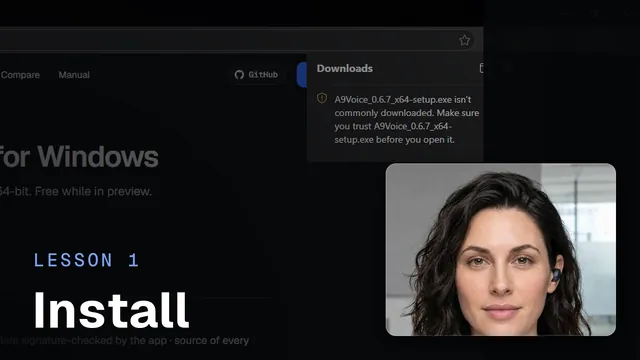 Installing A9 VoiceWatch the 1-minute video
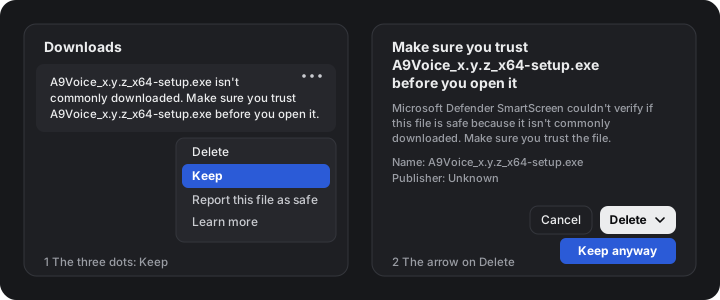
Edge may say the file “isn’t commonly downloaded”. A9 Voice is new and isn’t code-signed yet (that’s a paid certificate we’ll add once the project is self-funding), so browsers and Windows haven’t seen it often. In Edge’s Downloads panel, the three dots next to the file offer Keep; a second box then asks you to confirm, and the arrow on its Delete button offers Keep anyway. Chrome shows a similar note.
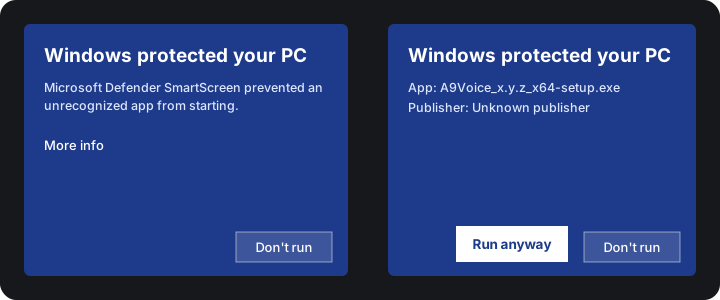
Windows Defender SmartScreen can also show a note for installers from publishers it hasn’t seen many downloads from yet. It shows the publisher and the file; choosing More info reveals the details and the option to continue.
To verify the file, compare its SHA-256 with the one above, or open the GitHub release. In PowerShell, Get-FileHash followed by the file name prints it.
Questions? Getting started covers the first run, and Troubleshooting the rest.