
Manual · Notes
Asking your notes
Ask a question in plain words across every meeting you have recorded and get an answer that links to the exact moment. Use Quick for a short answer and Deep to find every meeting a topic came up in.
Last updated for A9 Voice 0.7.1
Ask answers a question from your notes. A9 Voice searches everything on your PC, picks the passages that matter, and writes an answer in which every fact links to the moment it was said. Answers come only from your notes (and your dictations, if you search them), and when the notes don't cover the question, it says so.
Looking for a word instead of an answer? That is Search.
The Ask page#
Ask has its own place in the sidebar: Home, Transcribe, Notes, Ask, then a divider and Dictionary. The Ask your notes button next to the search box on Home and Notes opens it too.
- Click Ask in the sidebar.
- Type a question in the large box, such as "When is the release cut, and what did Priya flag?"
- Leave the mode on Quick, or pick Deep or a template (see Quick and Deep).
- Press Enter or click Ask.
- Read the answer. Each fact has a citation in blue that names the note, the date, the time and who said it. Click it and the note opens at that moment.
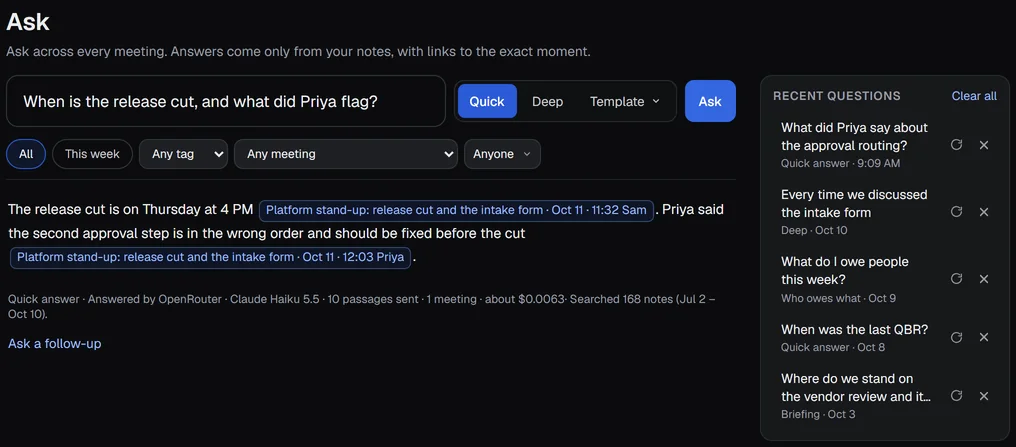
The line under the answer says how it was made, for example "Quick answer · Answered by OpenRouter, Claude Haiku 5.5 · 10 passages sent · 1 meeting · about $0.0063 · Searched 168 notes (Jul 2 – Oct 10)". It names the template, the model that answered, how many passages were sent to it, how many meetings they came from, about what that cost, and how much of your notes was searched.
Ask needs a language model with a key set up. If none is, you are asked to add one in Settings › Models (see Models).
Start with an example#
Before you ask anything, the page shows three example questions, one for each way of answering. Click one to ask it.
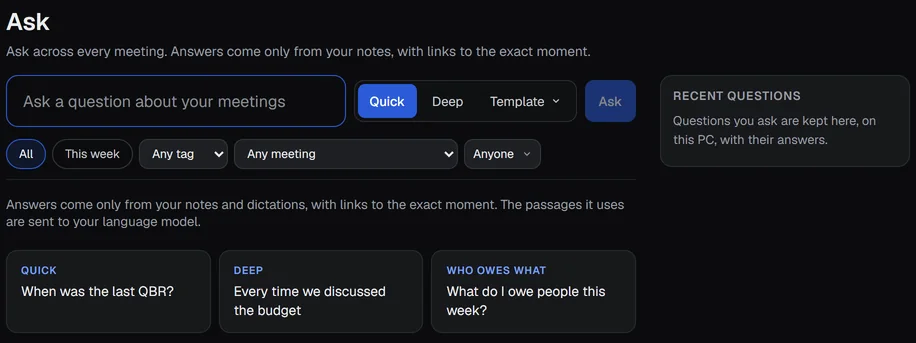
- Quick: "When was the last QBR?"
- Deep: "Every time we discussed the budget"
- Who owes what: "What do I owe people this week?"
If you have never started Notes, the page shows one more line: "Ask works across your meeting notes. Start your 30-day Notes trial." The button opens Notes. Ask keeps working on notes you have already recorded, during the trial and after it.
Limit the question#
Under the box are chips and menus: All, This week, Any tag, Any meeting and Anyone. Pick one before you press Ask to answer only from that slice, for example only notes tagged vendor, or only meetings where Marcus spoke. Any meeting lists Same meeting: names, and appears once you have meetings with the same name on different days, such as a weekly stand-up.
Dates and names you write in the question itself work too: see Plain-language times and people.
Quick and Deep#
The control next to Ask has three parts: Quick, Deep and Template. It picks how this question is answered.
- Quick is selected every time the page opens. It reads about 10 passages and answers in a few sentences.
- Deep looks for every meeting the topic came up in and lists them.
- Template answers in a set shape, such as a briefing or who owes what (see The Template menu).
Deep and a template apply to that one question only. After the answer, the control goes back to Quick. If you would rather start on Deep, change Default answer in Settings › Notes › Search.
| Quick | Deep | |
|---|---|---|
| What you get | A short answer in a few sentences. | A direct answer, then each item with every dated meeting it came up in, then what was searched. |
| Reads | about 10 passages | up to 120 passages, up to about 60,000 tokens |
| Searches | the words of your question | your question 3 to 5 ways |
| Good for | "When was the last QBR?" | "Every time we discussed the budget", "How many times did we talk about certificate management?" |
What Deep does#
Quick finds a meeting. Deep is built to find every meeting, so a question like "What are the QBR decks we are working on?" lists each deck with the meetings it came from.
- It searches your question several ways. The Ask: Quick model rewrites it as 3 to 5 searches, with synonyms and abbreviations ("QBR", "quarterly business review"), and A9 Voice merges the results.
- It covers every meeting. It takes the best few passages of every meeting before taking more from any one, so one long meeting can't crowd out the others.
- It keeps going for counting questions. For "how many times", "how often", "every time" and "all the", it keeps pulling meetings until another page of results adds none you don't have, within its limits.
The answer starts with the direct answer. Then each distinct item follows with every meeting it came up in, dated and cited, for example "IT Operations: Aug 10 QBR planning, Sep 4 stand-up, Oct 2 1:1". A counting question gives the count and a dated list of the meetings. The last line says what was covered, and the same line is in the footer:
Searched 168 notes (Jul 2 – Oct 10) with 4 searches; 7 meetings matched.
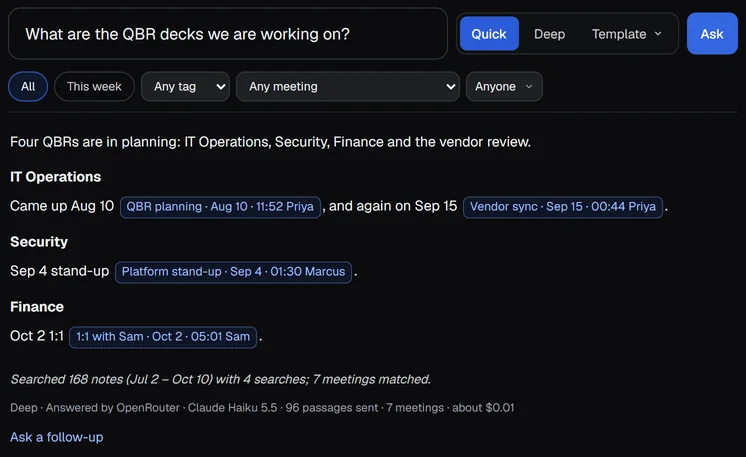
If the notes don't settle the question, Deep says what is missing instead of padding the answer.
Deep takes longer than Quick (the app says up to a minute while it works) and costs more, "a few cents at most". Hover over Deep to see an estimate for your model, such as "Deep · about 2¢ with Claude Haiku 5.5". The footer under each answer says what that answer cost.
Choose the Deep model#
Open Settings › Models and click Change on Ask: Deep. A template can name its own model too. The list holds every model your providers offer. A Good for Deep badge marks models with a context of 100,000 tokens or more and a stronger tier, and each row shows about what one Deep answer would cost. Same as Summaries is the default. A stronger model writes fuller answers. See Models.
Settings › Notes › Search has a Models for Ask row that opens the same page.
The Template menu#
Template ▾ opens a list of the other ways to answer: Briefing, Latest on…, Who owes what, Decision log, Meeting prep, Exec status, any templates you made, and Edit templates… at the bottom. Pick one and the segment shows its name, for example Who owes what. Like Deep, it applies to that one question.
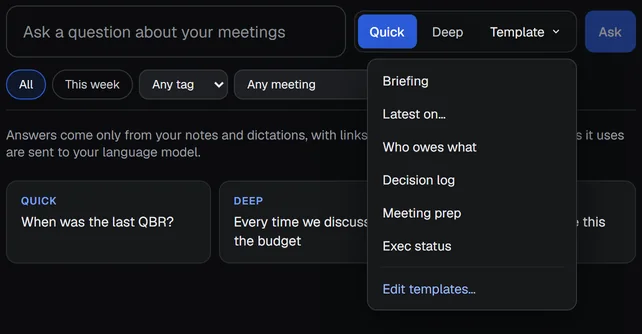
Edit templates… opens Settings › Templates, where you change them (see Edit the templates).
Answer templates#
| Template | What you get | Reads | Looks back | Newest first |
|---|---|---|---|---|
| Quick answer | A short answer in a few sentences. | about 10 passages | any time | no |
| Deep | A direct answer, then each item with every meeting it came up in, then what was searched. | up to 120 | any time | no |
| Briefing | Background, how it developed (dated), core issues, current status, open items with owners, with quotes shown as (Note, date). | about 50 | any time | no |
| Latest on… | The most recent mention first with its date, then what changed since the one before, then earlier ones. | about 40 | any time | yes |
| Who owes what | Commitments grouped by person, with due dates and where each was said. Flags what is overdue. | about 50 | 90 days | yes |
| Decision log | Each decision with its date, who decided, the reason and the source quote. | about 40 | any time | no |
| Meeting prep | For a person or topic: the last interactions, open items both ways, and points to raise. | about 40 | 90 days | yes |
| Exec status | Three to five bullets an executive can read in 30 seconds: status, risk, ask, business impact. | about 30 | any time | yes |
Quick answer and Deep have their own buttons; the menu lists the rest.
A template with about 10 passages searches with the words of your question and answers fast. A wider one first asks the model for more search words, searches more widely, and groups what it finds by meeting with each meeting's overview; it takes longer and costs more, "a few cents at most".
Newest first. For questions about "the last ask", "the latest", "the most recent" or "now", the newest matching passages must be read even when an older meeting matches the words better. A9 Voice does this whenever the template has Newest first on, and also whenever your question contains "last", "latest", "most recent", "current" or "now". The meetings are listed newest first with their dates, and the model is told to lead with the most recent mention.
Every template ends the same way: the answer uses only the passages found, cites each fact, writes about people factually (what they said, asked, decided or did) and says so when the notes don't cover the question.
Each template names the model that writes its answer: Same as Ask: Quick, Same as Ask: Deep, or a model of its own. Quick and Deep have their own model under Ask: Quick and Ask: Deep in Settings › Models, and both default to Same as Summaries. If you have not chosen a Summary model, A9 Voice uses the best one you have set up. If a model is busy, too slow or can't take a request that big, the next one you set up answers instead, and the line says "(after: ...)" with what went wrong, for example after: Groq rate limit (429) or after: request too large for Groq's per-minute token cap on this model. A request known not to fit is skipped without being sent.
Only A9 Voice's own blue citations appear. If a model writes its own marks, such as 【13】 or [13†source], they are turned into the same citations, or dropped when no passage has that number.
The cost is an estimate from the price table in Settings › Usage & cost, not a bill.
Edit the templates#
Open Settings › Templates and choose Ask templates, or pick Edit templates… in the Template menu. The list holds the eight built-in templates and your own. Built-ins can be edited and Reset to built-in brings the original back. Duplicate copies one to change; + Create template starts a new one; Delete… removes one of yours.
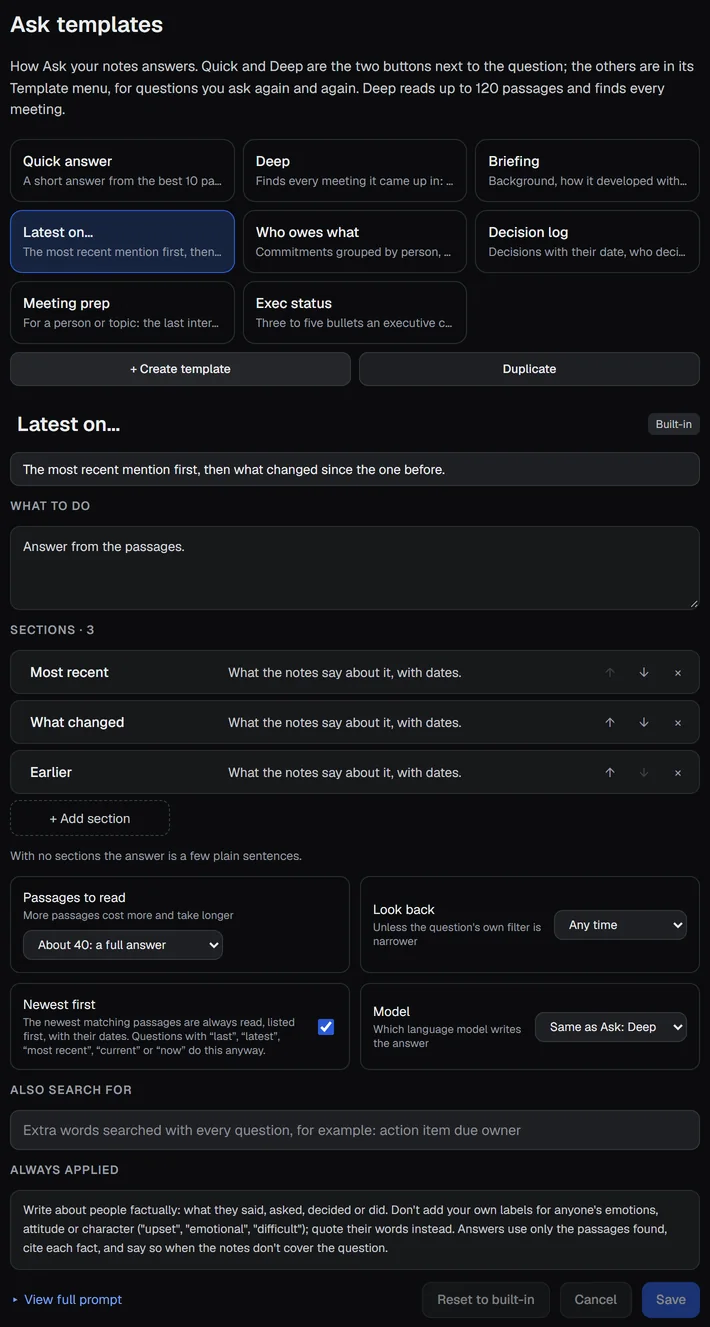
- What to do is plain words for the model, and Sections are the headings of the answer, each with what to write there. The arrows reorder them.
- Passages to read is about 10 for a short answer and 40 to 60 for a full one. More passages cost more.
- Look back limits the search to the last 30 or 90 days, unless the question's own filter (This week, a tag, a person) is narrower.
- Newest first, Model and Also search for (words searched with every question, for example "action item due owner") finish the template.
- View full prompt shows exactly what is sent, including the rules that stay fixed for every template.
Plain-language times and people#
You can write when and who in the question as you would say it. Before it searches, A9 Voice reads the times and the names of people your notes know, and uses them to narrow the search. This works in Quick, Deep and every template.
What it understood shows as chips above the answer:
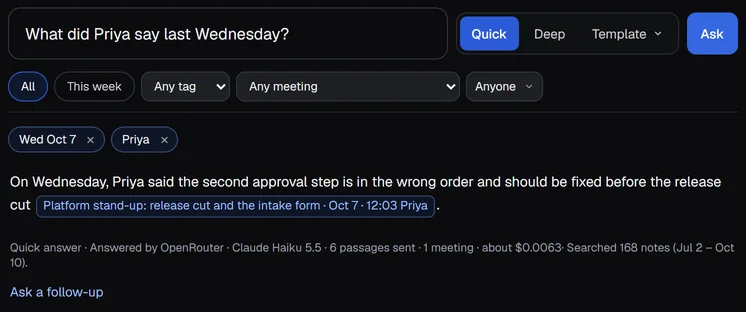
Click the small ✕ on a chip to ask the question again without it.
Times#
- Days: "yesterday", "last Wednesday", "3 days ago", "two weeks ago", or a date such as "September 4" or "2026-09-04".
- Ranges: "this week", "last week", "in September", "since the 1st".
"Last Wednesday" means the most recent Wednesday before today. "This week" runs from your PC's first day of the week.
A question that is only a time, such as "what happened last Wednesday", reads the summaries of the meetings from that day.
People#
A name your notes know becomes a chip, and "What did Priya say?" reads the passages Priya spoke before the passages that only mention her.
If a first name belongs to two people, the chip says so, for example Dana: 2 people, and both are used. Click the chip to pick one, and the question is asked again.
When nothing matches#
A9 Voice never leaves you with an empty page without saying why. If nothing matches the chips, it says, for example, "Nothing from Priya on Wed Oct 7. Showing the nearest days instead." and looks three days either side. If that finds nothing, it searches without the chips and says so.
Keys in the Ask box#
| Key | What it does |
|---|---|
| Enter | Asks in the selected mode. |
| Ctrl+Enter | Asks Deep, whatever is selected. |
| Alt+1 | Selects Quick. |
| Alt+2 | Selects Deep. |
| Alt+3 | Opens the Template menu. |
| Esc | Closes the Template menu. |
The same keys work in the Ask your notes tab of Ctrl+K. The tab says so along its bottom edge. The full list of keys is on Keyboard shortcuts.
Recent questions and follow-ups#
Recent questions#
The column on the right of the Ask page lists your last 50 questions. Each row shows the question, how it was asked (Quick, Deep or a template) and when: the time if it was today, the day if it was earlier.
- Click a row to see its saved answer, with "Saved answer from Oct 8" and Run again. Nothing is sent when you only look.
- Run again (the circular arrow on a row) asks the question again with today's notes.
- Delete (the cross on a row) removes that question.
- Clear all removes every one, after asking you to confirm.
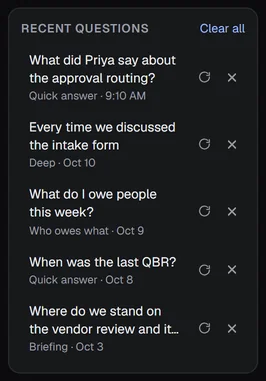
In a narrow window, the list folds behind a Recent questions button above the answer.
Recent questions are kept on this PC with the app's other data, in a small file in A9 Voice's data folder, and are never sent anywhere. They also include questions you ask from Ctrl+K.
Ask a follow-up#
Under an answer, Ask a follow-up opens a second box. Type a question about the answer and press Enter. The question and answer above go along as context, and the same filters apply. The follow-up's answer appears under the first, labeled Follow-up.
There is one follow-up, not a chat. To go further, start a new question; the one you just asked is in Recent questions.
From Ctrl+K#
Press Ctrl+K anywhere in the A9 Voice window and open the Ask your notes tab to ask without leaving what you are doing. It has the same Quick, Deep and Template control, the same keys and the same filters. Open in Ask, at the bottom of the tab, carries the question and its answer over to the Ask page.
What Ask sends and where it goes#
- Only the passages A9 Voice picked go to your language model, with your question. Never a whole note, and never any audio. For Deep and the wider templates the question is sent once first so the model can suggest more search words. A follow-up also sends the question and answer it follows.
- Searching is done on your PC. The index is a file in A9 Voice's data folder. The same goes for working out the times and people in your question.
- Recent questions stay on this PC. They are never sent anywhere and are not part of any request.
- A model on your own PC keeps all of it on your PC. Add a local server in Settings › Models with Add custom API.
See Privacy and your data for everything that can leave your PC.
When there is no answer#
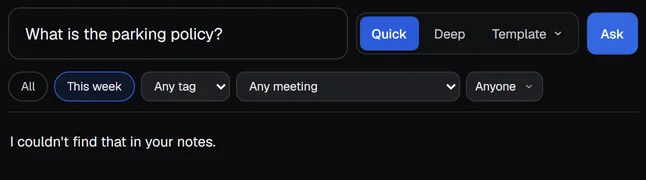
If nothing in your notes is about the question, you get "I couldn't find that in your notes." Nothing is invented. When the search finds no passages at all, nothing from your notes is sent to the model. Try different words, widen the filters, or remove a chip.
If something goes wrong#
- Ask says to add a key. Ask uses a language model. Add one in Settings › Models.
- The answer is missing a meeting you know is there. Try Deep, or remove a chip: a date or a name may have narrowed the search. A note you just made can take a few seconds to be searchable.
- The footer says "after: request too large for Groq's per-minute token cap". One request was bigger than your Groq plan takes in a minute. It is not a rate limit and never counts as usage. The next model answered. Choose a model with more room for Ask: Deep.
- Dictations never show up. Check that Search dictations too is on in Settings › General.
More in Troubleshooting.
Related#
- Search and Ask: find words in your notes, and add folders of older notes.
- The note page: ask about one note, and read it in full.
- Models: pick the model for Quick and for Deep.
- Language models: the keys Ask needs.
- Connector for AI apps: let Claude or ChatGPT search the same notes.
Something missing or wrong? Report an issue, or use Copy diagnostics in Settings › General when asking for help.